IJams
<iimg>  </iimg> </iimg>
|
Features
- Browse the kJams library right from your iPhone.
- Submit songs for you to sing.
- View your song history.
- Organize your favorite songs into your personal "Favorites" list.
Using iJams
The following steps will setup kJams to allow connections from iJams running on your iPhone or iPod Touch.
- From kJams, enable the web server.
- Download iJams from the Apple iPhone app store to your iPod Touch or iPhone.
- The first time iJams starts up, it will search the local wifi network for a kJams server. If a kJams server is found, iJams will automatically connect to it and show the Singers View.
- If no kJams server is found on the local wifi network, then the Venues View will be appear.
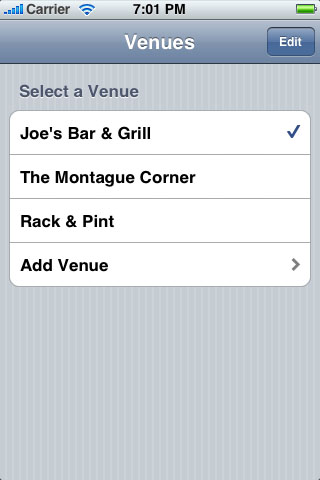
Venues View
Use the Venues View to connect to any of your previous venues or add new venues. Venues which have been found on the local wifi network will also be displayed in this view.
Singers View
After connecting to a venue, the Singers View will appear. Login to the venue as an existing singer by selecting your name from the list and entering the password, or add yourself as a new singer in this venue by touching "Add Singer".
Search
Search for songs you can sing at this venue by touching the "Search" button in the upper right.
<iimg> </iimg>
Tonight
View the songs you have selected to sing tonight.
Favorites
Organize songs into your own personal "Favorites" list.
<iimg> </iimg>
History
View the songs you have previously sung at this venue.