64bit/Help/Qt Update
When there is a Kit version update, follow these steps:
- run Qt Maintenance Tool, select "add or remove components"
- select the new kit version to add, DO NOT deselect the old kit version to uninstall. Select only "macOS", "Sources", and "Qt Debug Information Files"
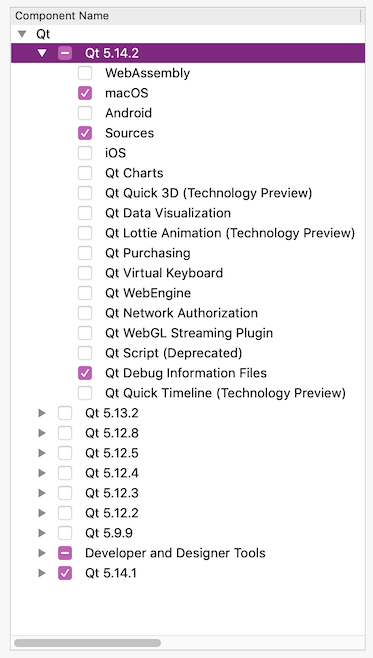
- complete the install
- Run Qt Creator
- go to Kit Settings
- rename the old kit to "64_old", rename the new kit to "64"
- click "make default" for the new kit "64"
- Open the CFTest project and do these steps:
- copy the kit settings for debug / release from the old kit (right click->copy steps from another kit->64_old)
- build and run with new kit, ensure it works
- delete the auto-created build configs (debug, profile, release), and default deployment method
- delete the reference to the old kit settings under "Build & Run"
- open the kJams project, and do the same steps
- run Qt Maintenance Tool, select "add or remove components"
- now deselect (uncheck) the old kit, and uninstall it