KHD
How to install kJams with a Karaoke Hard Drive
- Open the "1 TB KAR DJ MV" drive, inside you'll see a folder called "kJams"
- Select that folder and go to the File menu and pick "Make Alias"
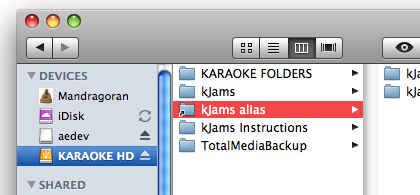
- In another window, open your Home folder, and go into your Music folder
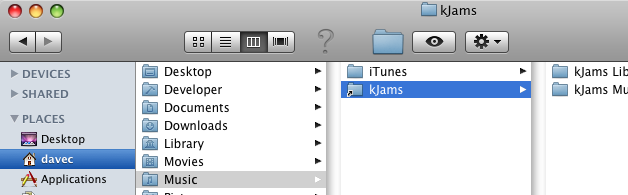
- Drag the "kJams alias" from step 2 and drop it into your Music folder
- Rename the alias so that it does NOT have the word "alias" on the end, also delete the space, such that the alias is called exactly "kJams"
- Launch kJams, it will load the library (taking a few seconds), sort by name (a few more seconds)
- if it asks you to update, go ahead and update
YAY! That's it!