Restore
If kJams has directed you here, it means that, unfortunately, you've run into a particularly nasty bug requiring that you restore from a previous backup.
The good news is that kJams keeps automatic backups of the index ("Songs.ktd") file, so that if you run into trouble of some kind, you easily can restore from one of your backups.
Currently, there's no bulit-in way to do this, so here's how you do it manually.
- Quit kJams
- go to the "kJams Library" folder. it is located here:
/Users/<you>/Music/kJams/kJams Library/...
That means, go into your startup drive (mac: "Macintosh HD", windows: "C:\", then in there go into the folder called "Users", then in there go into YOUR user's folder, the folder with the NAME of your user. From there, go into Music (or "My Music"), etc. get it? - inside that folder ("kJams Library"), do you see a sub-folder called "Songs.ktd [Backups]", AND it's not empty?
- YES: I see the folder called "Songs.ktd [Backups]" (and inside it is NOT empty)
- do NOT go inside that folder! stay in the folder "kJams Library", do the following:
- Find the file called "Songs.ktd", in the folder "kJams Library", it is at the SAME LEVEL as the folder called "Songs.ktd [Backups]"
- DO NOT DELETE the folder called "Songs.ktd [Backups]" (OMG!)
- DO NOT GO INSIDE the folder called "Songs.ktd [Backups]"!! If you delete something in there, YOU WILL LOSE YOUR BACKUPS!
- This file:
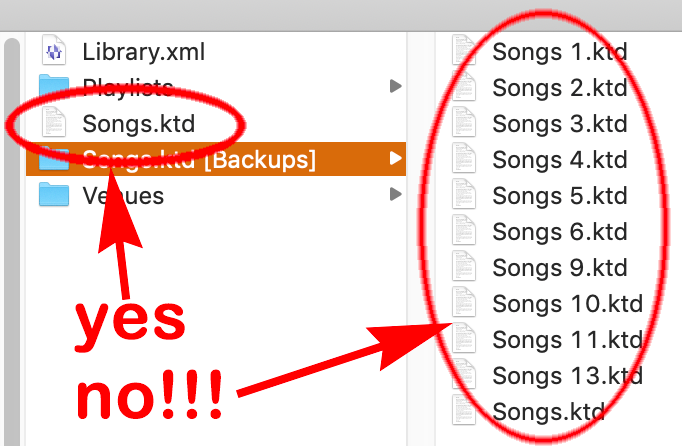
- Delete that one file "Songs.ktd"
- now run kJams, it will present a list you can choose from
- choose the most recent one from BEFORE the problems started, click OK
- you should be back in business
- if you are NOT back in business, try an earlier backup (start again from the top)
- do NOT go inside that folder! stay in the folder "kJams Library", do the following:
- NO: I do NOT see any folder called "Songs.ktd [Backups]", OR i see it but it's EMTPY
- you were unfortunately running a version of kJams that is too old
- the only way out is to restore from a backup that YOU made: manually restore from your own backup.
- If you haven't ever made any backups, the only thing you can do is rebuild your library
- YES: I see the folder called "Songs.ktd [Backups]" (and inside it is NOT empty)