Music Store
Music Store
<iimg> </iimg> </iimg>
|
<iimg> </iimg> </iimg>
|
Take Note: iTunes does not sell karaoke!
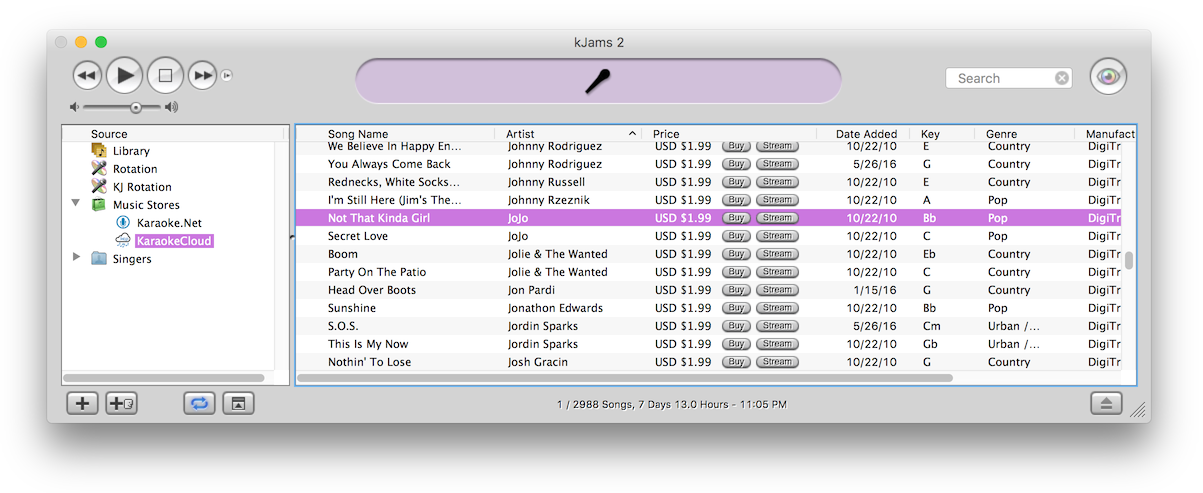
First, click the "disclosure triangle" (twirly arrow) on the "Music Stores" icon. Then click one of the music store icons (only TriceraSoft and Karaoke Locker for now) to see what's in the store. Search the store. Click the "Buy Song" button :) On lots of songs! Okay you do have to fill out your "One Click Settings" (see below) in the preferences. If you want true one click with no questions asked, then also turn off the "Confirm All Purchases" check box. To buy songs you can also just drag them to your library, that is how you can buy multiple songs at once, select them all and drag them to your library. You can hear a sample by double clicking the song.
Note: Show your Tasks window just after start up. The *first* time you start with no music store, kJams must download and parse the store, only AFTER that will the store appear in the list on the left. Watch the tasks window to see when these tasks complete.
If you select the "Music Stores" little shopping bag icon, you'll get info about each store (only one for now), and a double click on the store will show you the songs in the store.
The music store will ask you to update it once per month. If you decline to update it, it will wait another month to ask you. You can udpate the store any time however, by context clicking it's playlist icon and picking "Reload Music Store".
One Click Settings
Notice: TriceraSoft will only take Visa or MasterCard.

In the Preferences->Store you can fill out your credit card info or Gift Card info. Gift Cards are ONLY used for TriceraSoft. Even if you pick "Use Gift Card" in the prefs, the credit card info will be used if you buy a song in the Karaoke Locker store.
You can purchase a gift card from TriceraSoft here.
Your Credit Card will be declined once
Take note that your credit card will work perhaps the first couple times, but then will be declined. You will have to call your credit card company and tell them to allow microtransactions at the music store vendor (you may have to call once for each store). For more info, see Credit Card Declined.
Publishers available in the Stores
TriceraSoft:
All Hits
Ameri Sing
DK Karaoke
Forever Hits
General Hits
JVC Karaoke
Kantatu (Spanish!)
Karaoke Hits
Karaoke Monthly
Monster Hits
Mr. Entertainer
Music Factory
Music Maestro
NuTech
Pioneer
SBI
Sundown Karaoke
Sunfly
SuperCore
ZOOM
Karaoke Locker:
Stingray Music (Sound Choice)
Music Factory
From Karaoke Locker
If kJams fails during the purchase process for some reason, DO NOT CLICK THE BUY BUTTON AGAIN!!! Clicking it again won't make it work if it failed before, it will just charge you again. You will still get an email receipt. In the email receipt you will find your order number. You can still download your song and add it to your kJams library by clicking on this link: http://venuevj.com/lostkjams.pcdj Enter your email address and order number and you will get a link you can use to download your song.
From TriceraSoft
All sales are final. It is your responsibility to make backups. You will receive an email receipt with a download link, these links will expire in 2 days from date of purchase. Transactions are archived after 2 weeks, so if you need TriceraSoft to find your transaction after 2 weeks, there is a $15 administration fee. If kJams crashes or otherwise fails during the purchase process, just go to your email and use the link provided to download your song. Do not click the buy button again thinking it will work, you will just be buying the song again, and remember: no refunds. Note: If you need to download the song manually from the email receipt, the song may download with the ".exe" extension, due to something dumb somewhere not yet discovered. In that case, just change the name to end in ".zip" before adding the song to kJams.
Press Release from TriceraSoft
April 7, 2009 SBI Global Ltd is a supplier of karaoke and known for their large catalogue of music, karaoke, and video releases. SBI has provided their (11,000 song) catalogue to distribute on the TriceraSoft catalogue (and within kJams) in association through Sunfly Karaoke. TriceraSoft welcomes the addition of SBI to the catalogue and look forward to customers enjoying the new variety of songs.
About TriceraSoft:
TriceraSoft is a Video, Karaoke, and Audio Software Manufacturer, Hardware provider, and Karaoke Content Distributor located in Brampton, Ontario, Canada. Information on TriceraSoft can be found on tricerasoft.com
About SBI Global Ltd:
SBI Global Limited is a content manufacturer and license release agent that has branches and representatives in Thailand, United States, Germany, and United Kingdom. Information on SBI can be found on SBIGlobal.com.
About Sunfly Karaoke:
Sunfly Karaoke is a content manufacturer located in the United Kingdom and has branches in Australia. Information on Sunfly Karaoke can be found on sunflykaraoke.co.uk
Contact:
<email>submit@tricerasoft.com|Gai Marcos</email> President, TriceraSoft
If your store ever disappears for some reason
Context Click on the music store and pick "Reload Music Store"