Blog/Parallels/TimeMachineFail: Difference between revisions
No edit summary |
No edit summary |
||
| Line 17: | Line 17: | ||
here are some screen shots of the situation: | here are some screen shots of the situation: | ||
https://karaoke.kjams.com/screenshots/parallels/tm/1_tmfail.png<br> | |||
above: time machine failing is the first indication i have of the problem | above: time machine failing is the first indication i have of the problem | ||
https:// karaoke.kjams.com/screenshots/parallels/tm/2_bad_name.png<br> | |||
above: note the incorrect mount point name | above: note the incorrect mount point name | ||
https:// karaoke.kjams.com/screenshots/parallels/tm/3_about_to_remount.png<br> | |||
above: i am about to (correctly) dismount the drive, it should not be a problem, right? | above: i am about to (correctly) dismount the drive, it should not be a problem, right? | ||
https:// karaoke.kjams.com/screenshots/parallels/tm/4_shouldnt_happen.png<br> | |||
above: dismounting the drive should NOT cause this problem | above: dismounting the drive should NOT cause this problem | ||
https:// karaoke.kjams.com/screenshots/parallels/tm/5_correct_name.png<br> | |||
re-mounting the drive, it now has the correct name | re-mounting the drive, it now has the correct name | ||
https:// karaoke.kjams.com/screenshots/parallels/tm/6_tmftw.png<br> | |||
now time machine works again | now time machine works again | ||
Revision as of 21:21, 13 June 2014
1) mounted hard drives (external devices) randomly dismount and remount when VM is running
2) restarting the host OS: the restart is canceled by parallels
3) if you restart the VM, HDs that were previously mounted do NOT re-mount
problem 1
i have a mac mini running 10.9
this mac has several external hard drives connected
this mac runs parallels
in the guest OS, i run 10.6.8 Server
one of the external drives is mounted in the guest OS (via Devices->External Devices)
the server serves time machine to my LAN, using the mounted drive from the host OS
periodically, the drive simply dismounts without warning, then shows the "The disk was not ejected properly" error, then the drive re-mounts (auto-dismissing the error dialog) but the drive now has a different mount-point name (has a "1" appended). the new mount point name breaks Time Machine.
this problem occurs daily.
here are some screen shots of the situation:
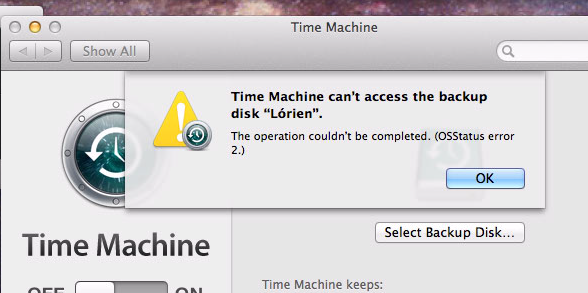
above: time machine failing is the first indication i have of the problem
https:// karaoke.kjams.com/screenshots/parallels/tm/2_bad_name.png
above: note the incorrect mount point name
https:// karaoke.kjams.com/screenshots/parallels/tm/3_about_to_remount.png
above: i am about to (correctly) dismount the drive, it should not be a problem, right?
https:// karaoke.kjams.com/screenshots/parallels/tm/4_shouldnt_happen.png
above: dismounting the drive should NOT cause this problem
https:// karaoke.kjams.com/screenshots/parallels/tm/5_correct_name.png
re-mounting the drive, it now has the correct name
https:// karaoke.kjams.com/screenshots/parallels/tm/6_tmftw.png
now time machine works again
problem 2
if i restart the host OS, the restart is HALTED because parallels cancels the restart while it suspends the VM. the restart SHOULD NOT BE HALTED
problem 3
if i suspend the VM, then quit and re-run parallels, and the VM is launched again, the HDs that were previously mounted DO NOT GET RE-MOUNTED. All discs that were mounted during suspend (or shutdown) should be re-mounted when the VM comes back online