Jagged Graphics: Difference between revisions
No edit summary |
No edit summary |
||
| Line 1: | Line 1: | ||
Why are the graphics jagged? | Why are the graphics jagged? | ||
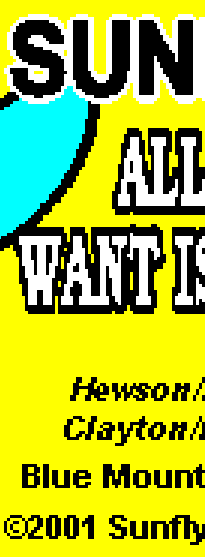
It's because the text and graphics are actually bitmaps, they're not "fonts" or "vectors" actually, they're made of pixels. The dimensions of CD+G graphics are 300 x 216. You'll notice that's very, very small. Now, when you display this on a "Standard Def" TV (720 x 480), the pixels are doubled so you get 600 x 432, which more or less fills the screen and with the colorized border still looks pretty good. The "problem" is when you view the graphics on a computer monitor or HDTV where you've got orders of magnitude more pixels to go around. Your original graphic is 300 x 216, so you have to STRETCH that to fill in more pixels. You know what happens when you zoom in to pixels? You get jaggies. Now | It's because the text and graphics are actually bitmaps, they're not "fonts" or "vectors" actually, they're made of pixels. The dimensions of CD+G graphics are 300 x 216. You'll notice that's very, very small. Now, when you display this on a "Standard Def" TV (720 x 480), the pixels are doubled so you get 600 x 432, which more or less fills the screen and with the colorized border still looks pretty good. The "problem" is when you view the graphics on a computer monitor or HDTV where you've got orders of magnitude more pixels to go around. Your original graphic is 300 x 216, so you have to STRETCH that to fill in more pixels. You know what happens when you zoom in to pixels? You get jaggies. Now, if you turn on "CoreGraphics" (advanced prefs), then kJams will do [http://en.wikipedia.org/wiki/Bicubic_interpolation bicubic] smoothing on the graphics, but that will only look marginally better:<br> | ||
http://kjams.com/resources/bicubic_1.png | http://kjams.com/resources/bicubic_1.png | ||
http://kjams.com/resources/bicubic_2.png | http://kjams.com/resources/bicubic_2.png | ||
Revision as of 00:52, 6 December 2009
Why are the graphics jagged?
It's because the text and graphics are actually bitmaps, they're not "fonts" or "vectors" actually, they're made of pixels. The dimensions of CD+G graphics are 300 x 216. You'll notice that's very, very small. Now, when you display this on a "Standard Def" TV (720 x 480), the pixels are doubled so you get 600 x 432, which more or less fills the screen and with the colorized border still looks pretty good. The "problem" is when you view the graphics on a computer monitor or HDTV where you've got orders of magnitude more pixels to go around. Your original graphic is 300 x 216, so you have to STRETCH that to fill in more pixels. You know what happens when you zoom in to pixels? You get jaggies. Now, if you turn on "CoreGraphics" (advanced prefs), then kJams will do bicubic smoothing on the graphics, but that will only look marginally better: