Mini-Monitor: Difference between revisions
No edit summary |
m Dave moved page Artwork to Mini-Monitor |
||
(No difference)
| |||
Revision as of 02:42, 6 September 2021
The Artwork Panel shows the currently playing song graphics. It's handy for when the KJ is not able to see the Lryics screen (say for example the TV is in front of the singer on the stage, not in front of the KJ).
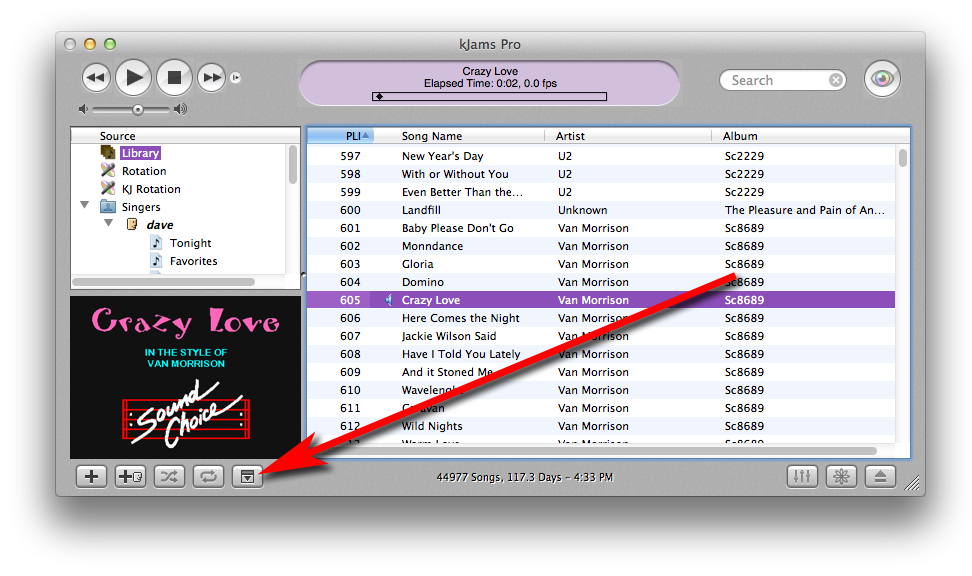
To reveal it, click the little tri-angley button to the right of the repeat button (which looks like two arrows pointing to each other's tail)
Eventually, you'll also be able to see the selected singer's Photo (and take a picture too), or use it to cue up the next song (showing a selected song rather than the current song)
Second Video Window
You can also show a second video window (see the Windows menu). This window operates just like the first one except for these things:
- it can not go transparent (let me know if you need this)
- it does not respond to auto-show and hide preferences
Other than that, it behaves exactly the same. The Video window sizing commands operate on the front-most video window.
For a rather awesome setup, you can use iDisplay and put your second Video window onto that screen, and then put that in front of the singer.