Defender: Difference between revisions
Jump to navigation
Jump to search
No edit summary |
No edit summary |
||
| Line 1: | Line 1: | ||
When you run kJams for the first time, '''Windows Defender''' may complain, and then kJams crashes (exits unexpectedly).<br> | When you run kJams for the first time, '''Windows Defender''' may complain, and then kJams crashes (exits unexpectedly).<br> | ||
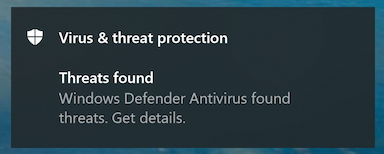
Here is the complaint you'll see:<br> | # Here is the complaint you'll see:<br>https://karaoke.kjams.com/screenshots/defender/shot1.png<br> | ||
https://karaoke.kjams.com/screenshots/defender/shot1.png<br> | # Click the banner to get details, you'll see this:<br>________________________________________________<br>https://karaoke.kjams.com/screenshots/defender/shot2.png<br>________________________________________________ | ||
# This is known to be a "[https://en.wikipedia.org/wiki/False_positives_and_false_negatives false positive]". See the word "Severe" there on the right? See the little downward pointing chevron under it? Click that. | |||
Click the banner to get details, you'll see this:<br> | # "User account control" may (or may not) now show a dialog that asks "Do you want to allow this app to make changes to your device", specifying that the app is "Windows Security". If you see this dialog, click "Yes". | ||
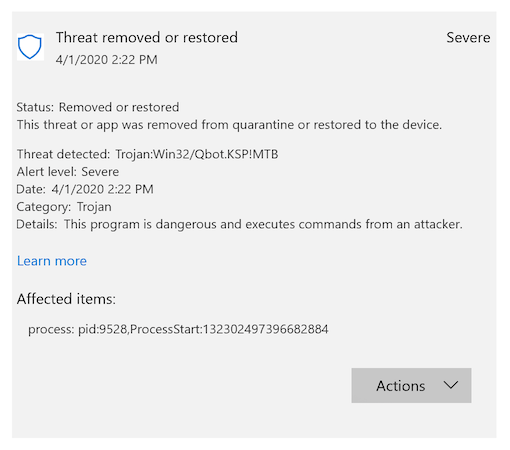
# Now you should see this:<br>https://karaoke.kjams.com/screenshots/defender/shot3.png | |||
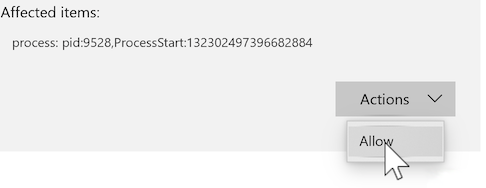
https://karaoke.kjams.com/screenshots/defender/shot2.png<br> | # Now click on the "Actions" button and pick "Allow", like this:<br>https://karaoke.kjams.com/screenshots/defender/shot4.png | ||
# Now run kJams again, and you'll have no problems. | |||
This is known to be a "[https://en.wikipedia.org/wiki/False_positives_and_false_negatives false positive]". See the word "Severe" there on the right? See the little downward pointing chevron under it? Click that. | |||
"User account control" may (or may not) now show a dialog that asks "Do you want to allow this app to make changes to your device", specifying that the app is "Windows Security". If you see this dialog, click "Yes". | |||
Now you should see this:<br> | |||
https://karaoke.kjams.com/screenshots/defender/shot3.png | |||
Now click on the "Actions" button and pick "Allow", like this:<br> | |||
https://karaoke.kjams.com/screenshots/defender/shot4.png | |||
Now run kJams again, and you'll have no problems. | |||
Revision as of 12:43, 21 July 2020
When you run kJams for the first time, Windows Defender may complain, and then kJams crashes (exits unexpectedly).
- Here is the complaint you'll see:
- Click the banner to get details, you'll see this:
________________________________________________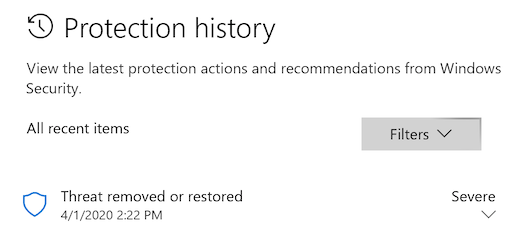
________________________________________________ - This is known to be a "false positive". See the word "Severe" there on the right? See the little downward pointing chevron under it? Click that.
- "User account control" may (or may not) now show a dialog that asks "Do you want to allow this app to make changes to your device", specifying that the app is "Windows Security". If you see this dialog, click "Yes".
- Now you should see this:
- Now click on the "Actions" button and pick "Allow", like this:
- Now run kJams again, and you'll have no problems.