Auto-Cue: Difference between revisions
Jump to navigation
Jump to search
| Line 3: | Line 3: | ||
It may not be desirable for some songs, which expect you to start singing before the first bit of music (however most songs like that will give you a little "tuning prompt" indicating the pitch of the first note to be sung, so it's not a problem. | It may not be desirable for some songs, which expect you to start singing before the first bit of music (however most songs like that will give you a little "tuning prompt" indicating the pitch of the first note to be sung, so it's not a problem. | ||
==In Preferences== | ==In Preferences== | ||
Below you can see "Skip Silence at Start of Song" | Below you can see "Skip Silence at Start of Song", and also "Skip Silence at End of Song" | ||
https://karaoke.kjams.com/screenshots/prefs/general.png<br> | https://karaoke.kjams.com/screenshots/prefs/general.png<br> | ||
Revision as of 23:07, 7 December 2015
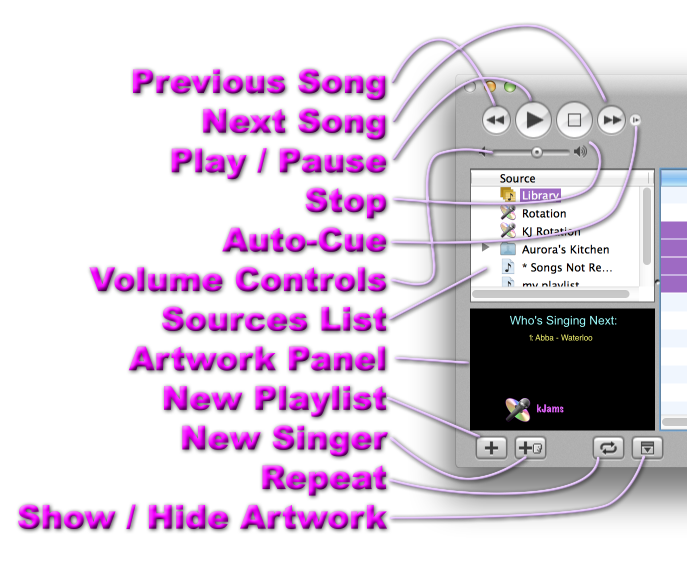
Auto-cue will skip the silence at the start of the song. You can turn this on for all songs (in preferences), or you can manually do it by pressing the small "Auto-cue" button in the main kJams Browser window (to the right of the "Next Track" button).
It may not be desirable for some songs, which expect you to start singing before the first bit of music (however most songs like that will give you a little "tuning prompt" indicating the pitch of the first note to be sung, so it's not a problem.
In Preferences
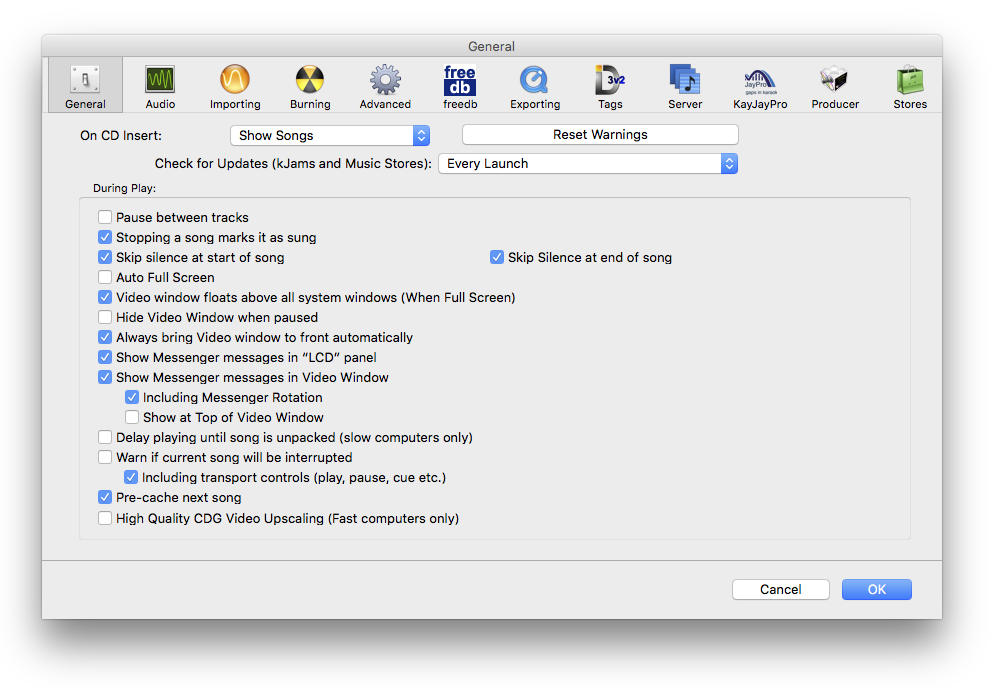
Below you can see "Skip Silence at Start of Song", and also "Skip Silence at End of Song"
In the Browser Window
Below you can see "Auto-Cue", the 5th item down from the top