Arrangement: Difference between revisions
Jump to navigation
Jump to search
No edit summary |
No edit summary |
||
| Line 2: | Line 2: | ||
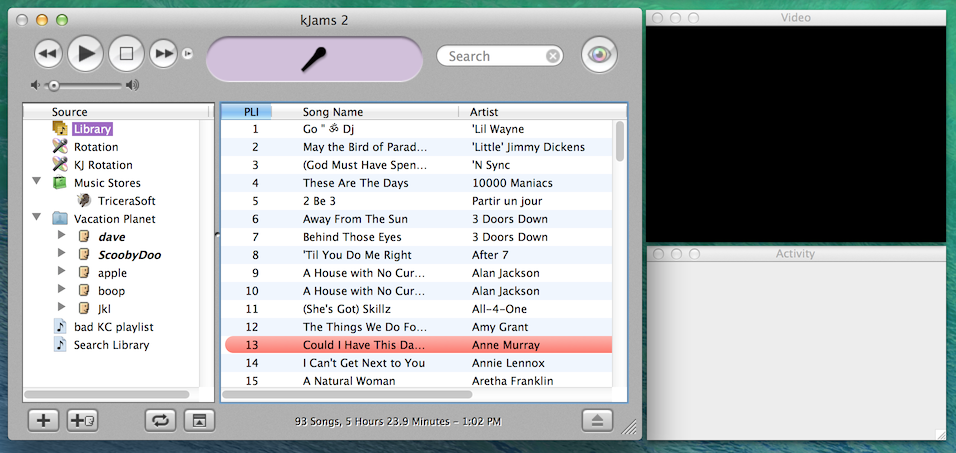
I recommend you arrange your windows like below, such that none are overlapped. If you have a 2nd monitor (or a TV) for the "Video" window, then you can just make "Activity" taller. Obviously you can scale this layout to fit your monitor, assuming it is larger. | I recommend you arrange your windows like below, such that none are overlapped. If you have a 2nd monitor (or a TV) for the "Video" window, then you can just make "Activity" taller. Obviously you can scale this layout to fit your monitor, assuming it is larger. | ||
To show the windows, go to the Window menu. | |||
https://karaoke.kjams.com/screenshots/layout.png | https://karaoke.kjams.com/screenshots/layout.png | ||
Revision as of 00:01, 24 September 2014
It's very important that you can SEE the "Activity" window. It is the only way you can know when certain operations are happening, for example: searching, push/pull meta data, database saving, song zipping / unzipping / playing etc.
I recommend you arrange your windows like below, such that none are overlapped. If you have a 2nd monitor (or a TV) for the "Video" window, then you can just make "Activity" taller. Obviously you can scale this layout to fit your monitor, assuming it is larger.
To show the windows, go to the Window menu.