Coupon: Difference between revisions
Jump to navigation
Jump to search
| Line 1: | Line 1: | ||
==Welcome== | ==Welcome== | ||
Coupons for discounts are | Get 10% off if you buy before the end of June 2013! Use this coupon code: CPN17198304398 Here's [[Coupon|How to use the coupon]]: | ||
Coupons for discounts are also available to the Military, Hospitals, Prisons, Students, School Labs, Places of Worship, and Humanitarian Aid workers. | |||
Coupons are also used when kJams is sold through a third party. In this case, you simply use the coupon to register kJams and obtain an official serial number | Coupons are also used when kJams is sold through a third party. In this case, you simply use the coupon to register kJams and obtain an official serial number | ||
Revision as of 17:23, 22 June 2013
Welcome
Get 10% off if you buy before the end of June 2013! Use this coupon code: CPN17198304398 Here's How to use the coupon:
Coupons for discounts are also available to the Military, Hospitals, Prisons, Students, School Labs, Places of Worship, and Humanitarian Aid workers.
Coupons are also used when kJams is sold through a third party. In this case, you simply use the coupon to register kJams and obtain an official serial number
How do i use it?
- If you want easy, detailed step-by-step instructions:
- Click here for Macintosh instructions
- Click here for Windows instructions
- For those of you who know what you're doing:
- Download the right file, install it, then run kJams.
- for the burning plugin: go to prefs->burning, click "Purchase"
- for the Application: go to Help->Purchase
- If you bought through a third party or otherwise obtained a coupon, then this actually is an "Activation" not a "Purchase", so don't worry, there is NO charge even though it says "Purchase".
- follow the steps until you get to the "Currency and Coupons" stage, then paste your coupon (Mac: Command-V, Windows: Control-V), then click the "Enter" button. You will see your total go to ZERO
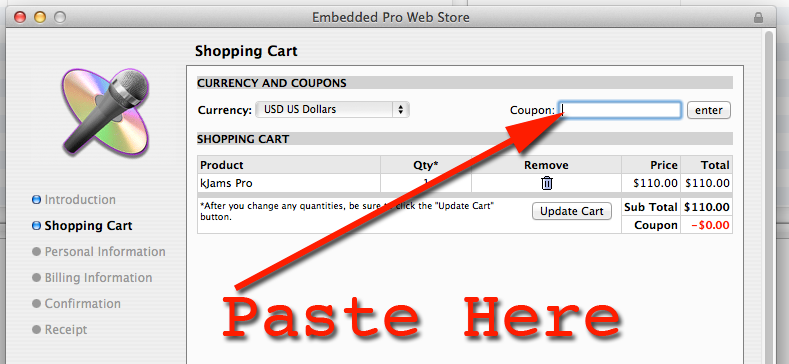
- Complete the activation, you will then see a "Receipt" window
- Close the receipt window (do not hide or minimize it)
- you're done!