Coupon/Win: Difference between revisions
Jump to navigation
Jump to search
Created page with "# If you bought the "Burning Plugin", there is no separate installer, you only need to install the application because the tryout plugin automatically comes with it. # If you ..." |
No edit summary |
||
| Line 1: | Line 1: | ||
# If you bought the "Burning Plugin", there is no separate installer, you only need to install the application because the tryout plugin automatically comes with it. | # If you bought the "Burning Plugin", there is no separate installer, you only need to install the application because the tryout plugin automatically comes with it. | ||
# If you haven't already, download the proper Application: <br><googa>http://dl.dropbox.com/u/195957/kJams/kJamsLiteWin.zip|kJams Lite|/downloads/Lite_Win</googa><br><googa>http://dl.dropbox.com/u/195957/kJams/kJamsProWin.zip|kJams Pro|/downloads/Pro_Win</googa> | # If you haven't already, download the proper Application: <br><googa>http://dl.dropbox.com/u/195957/kJams/kJamsLiteWin.zip|kJams Lite|/downloads/Lite_Win</googa><br><googa>http://dl.dropbox.com/u/195957/kJams/kJamsProWin.zip|kJams Pro|/downloads/Pro_Win</googa> | ||
# when your web browser asks what do do with the the download, click "Open" | |||
# Install it | # Install it | ||
## Double click the MSI file that has been downloaded. | |||
## Double click the | ## ignore the security warning if one pops up, just click "Run". (I swear i'm a nice guy, and you know where I live anyway.) | ||
## | ## go thru the installer process until the end | ||
# Run kJams from the Start menu | |||
## | |||
# Run kJams from the | |||
# If it is the Plugin: | # If it is the Plugin: | ||
## Go to the " | ## Go to the "Edit" menu in the menu bar and pick "Preferences…"<br>http://kjams.com/screenshots/coupons/win/prefs.png | ||
## Click on the "Burning" icon | ## Click on the "Burning" icon | ||
## Click the "Purchase" button (this is NOT a purchase, it is an activation | ## Click the "Purchase" button (this is NOT a purchase, it is an activation. If you bought from a third party you will NOT be charged) | ||
## When it asks "Are you sure?" click the "Yes" button, because you're sure. | ## When it asks "Are you sure?" click the "Yes" button, because you're sure. | ||
# If it is the Application | # If it is the Application | ||
## Go to the "Help" menu and pick "Purchase…" | ## Go to the "Help" menu and pick "Purchase…" | ||
# | # if it gives an error at this point, just hit OK and try again, and it will work | ||
f# Continue (if necessary) until you get to the "Shopping Cart" page | |||
# paste or type the coupon code<br>https://karaoke.kjams.com/screenshots/paste_coupon.png | # paste or type the coupon code<br>https://karaoke.kjams.com/screenshots/paste_coupon.png | ||
# click the "Enter" button | # click the "Enter" button | ||
# you should see the "Sub Total" go to ZERO. If you do not, something went wrong. If you can't figure it out, [[Office_Hours|contact me]] and i'll help. | # you should see the "Sub Total" go to ZERO. If you do not, something went wrong. If you can't figure it out, [[Office_Hours|contact me]] and i'll help. | ||
# complete the steps until you see the Receipt window<br>https://karaoke.kjams.com/screenshots/coupons/ | # complete the steps until you see the Receipt window<br>https://karaoke.kjams.com/screenshots/coupons/win/receipt.png<br><br> | ||
# close the receipt window (click the | # close the receipt window (click the red "X" in the top right) (do NOT hide it, do not minimize it, but CLOSE it) | ||
# you're all set! | # you're all set! | ||
Revision as of 20:31, 21 October 2012
- If you bought the "Burning Plugin", there is no separate installer, you only need to install the application because the tryout plugin automatically comes with it.
- If you haven't already, download the proper Application:
kJams Lite
kJams Pro - when your web browser asks what do do with the the download, click "Open"
- Install it
- Double click the MSI file that has been downloaded.
- ignore the security warning if one pops up, just click "Run". (I swear i'm a nice guy, and you know where I live anyway.)
- go thru the installer process until the end
- Run kJams from the Start menu
- If it is the Plugin:
- Go to the "Edit" menu in the menu bar and pick "Preferences…"

- Click on the "Burning" icon
- Click the "Purchase" button (this is NOT a purchase, it is an activation. If you bought from a third party you will NOT be charged)
- When it asks "Are you sure?" click the "Yes" button, because you're sure.
- Go to the "Edit" menu in the menu bar and pick "Preferences…"
- If it is the Application
- Go to the "Help" menu and pick "Purchase…"
- if it gives an error at this point, just hit OK and try again, and it will work
f# Continue (if necessary) until you get to the "Shopping Cart" page
- paste or type the coupon code
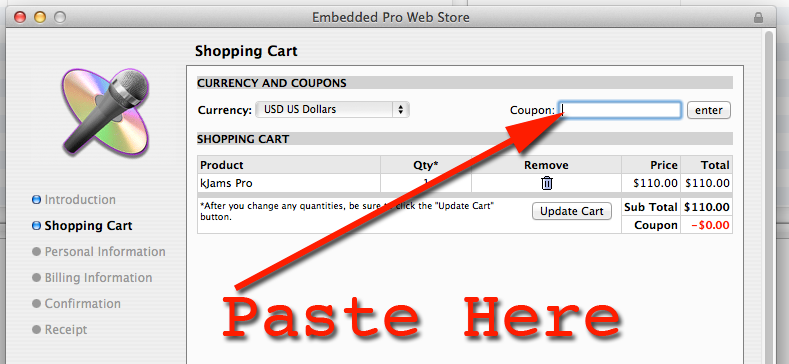
- click the "Enter" button
- you should see the "Sub Total" go to ZERO. If you do not, something went wrong. If you can't figure it out, contact me and i'll help.
- complete the steps until you see the Receipt window
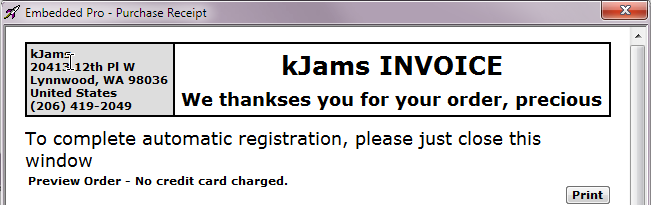
- close the receipt window (click the red "X" in the top right) (do NOT hide it, do not minimize it, but CLOSE it)
- you're all set!