CFLite old: Difference between revisions
Jump to navigation
Jump to search
No edit summary |
No edit summary |
||
| Line 75: | Line 75: | ||
** create a new project in your windows dev environment and add the two .cpp files.<br> | ** create a new project in your windows dev environment and add the two .cpp files.<br> | ||
** the "console.txt" is the example output that it '''should''' look like in your console | ** the "console.txt" is the example output that it '''should''' look like in your console | ||
* Source code changes for CFTest.exe | |||
** CFTest.exe looks for the "test.xml" Chiquitita.xml file in its parent directory. | ** CFTest.exe looks for the "test.xml" Chiquitita.xml file in its parent directory. | ||
* CFUtils.cpp lines 112 and 115 in the function Read_PList should use CFSTR() for the text in the call to CCFLog or CFTest.exe crashes when the xml file can't be read or if it doesn't parse correctly. | |||
Revision as of 09:40, 13 August 2008
This page documents how to build CFLite 476.10 such that you can then link to it in your Windows projects, and then blissfully use CFStrings, CFDictionaries, and all the other CFGoodness that CFLite will bring you. For a "quick and dirty" way to just start *using* CFLite on windows (without having to compile it), click here.
On Windows XP or Windows Vista:
- Download ICU4C
- Download CFLite 476.13.
- Get FreeBSD's flsl.c source file. Here is a local copy.
- Download include.zip (contains /usr/include/*, which includes AvailabilityMacros, AssertMacros and TargetConditionals from 10.5)
- You will need the contents of include/mach/ and include/i386/, and the files include/malloc/malloc.h, include/sys/cdefs.h, include/AssertMacros.h, include/AvailabilityMacros.h, and include/TargetConditionals.h from include.zip
- Install Cygwin. Follow the link for detailed instructions.
- Arrange the source files. This layout is the format that the patch understands.
- Extract CF-Lite to a place of your choosing. You'll need to get to the directory easily from cygwin, so make it somewhere simple.
- Open the directory where you extracted CF-Lite.
- The patch does not yet cover the following source files and their contained features. The build process for CF-Lite is... unique, you'll want to move or remove these files. A suitable Makefile would be superior.
- CFConcreteStreams.c
- CFMachPort.c
- CFMessagePort.c
- CFPlugIn_Instance.c
- CFRunLoop.c
- CFRunLoopPriv.h
- CFSocket.c
- CFSocketStream.c
- CFStream.c
- CFStringDefaultEncoding.h
- CFUserNotification.c
- CFVersion.c
- CFWindowsMessageQueue.c
- CFWindowsMessageQueue.h
- Create a folder in your windows directory named CoreFoundation. Under it, make a new folder named CoreFoundation.resources. Under that one, create one called CharacterSets. You should now have the path \WINDOWS\CoreFoundation\CoreFoundation.resources\CharacterSets.
- Move the files CFCharacterSetBitmaps.bitmap, CFUniCharPropertyDatabase.data, CFUnicodeData-B.mapping, CFUnicodeData-L.mapping into the new CharacterSets folder.
- Copy flsl.c into your CFLite folder.
- Create a folder named include, in the CF-Lite folder.
- Open the include folder that you just made.
- Create a folder named malloc. Copy include.zip's include/malloc/malloc.h into this folder.
- Create a folder named sys. Copy include.zip's include/sys/cdefs.h into it.
- Copy include.zip's include/AvailabilityMacros.h, include/AssertMacros.h, and include/TargetConditionals.h files and the include/mach and include/i386 folders into your include folder.
- Extract the ICU4C package in the include folder. It should extract into an icu folder.
Your include folder should look like this when you're finished.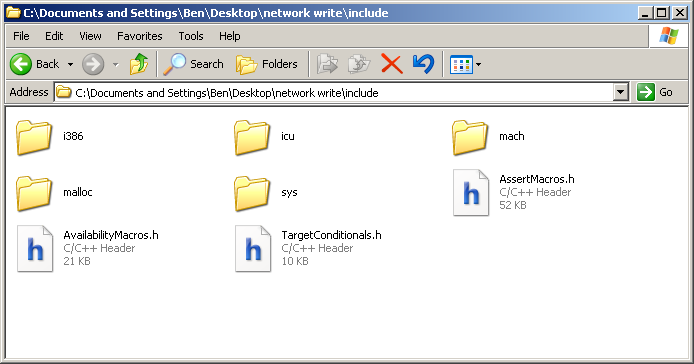
- Navigate to the folder where you extracted CF-Lite on your Cygwin command prompt.
- Cygwin will execute regular dos commands like dir, copy, del, or you can use their unix equivalents ls, cp, rm. Change directories with the cd command.
- Cygwin maps disk drive letters to a mount point in the folder /cygdrive/. For example; /cygdrive/c/ is equivalent to C:\, and /cygdrive/m/ would be M:\ at a DOS prompt or under My Computer.
- Apply the patch. The patch is against CFLite-476.13, patching will fail with CFLite-476.10.
- Use the command 'patch -p1 < cf_windows.patch' from inside the CF-Lite directory.
- Run make. Just type make and press enter.
- There are a lot of warnings.
- If you need to capture stderr during the build process, use make 2>error_log.txt instead.
- Your .dll and .lib files will be in your current directory. The directory include/CoreFoundation/ will contain the Core Foundation headers that you use for other programs.
- Using CF-Lite in your own programs:
- If you're using GCC
- You will need to define the preprocessor directive __WIN32__ in your build.
- Works just like using a DLL in other GCC apps.
- Make sure you use the -mno-cygwin flag to prevent gcc from linking with the cygwin dll and C runtime. Link with -lmsvcrt instead.
- Visual Studio 2005
- You will need to define the preprocessor directive __WIN32__ in your build.
- In release target builds, you need to disable Visual Studio's library loading trimming. To do this, open your project properties, expand Configuration Properties, expand Linker, select Optimizations, then set the field labelled references to 'Keep Unreferenced Data (/OPT:NOREF)'. If you don't do this, you can have crashes at fairly innocent seeming functions because Visual Studio didn't load the object code for that particular module.
- CoreFoundation relies on the stdint.h and stdbool.h files, you'll need stdint.h and stdbool.h They don't come with the compiler but are part of the C99 standard. You'll need to put them on your include path. I placed mine in my compiler's include folder because they help support C99 and don't interfere with my compiler workings. Since they are freely redistributable, stdint.h and stdbool.h can be had locally as well.
- If you're using GCC
- Download CFTest source files. This is the test harness sample project.
- You can ignore the XCode project
- create a new project in your windows dev environment and add the two .cpp files.
- the "console.txt" is the example output that it should look like in your console
- Source code changes for CFTest.exe
- CFTest.exe looks for the "test.xml" Chiquitita.xml file in its parent directory.
- CFUtils.cpp lines 112 and 115 in the function Read_PList should use CFSTR() for the text in the call to CCFLog or CFTest.exe crashes when the xml file can't be read or if it doesn't parse correctly.