Installing/64bit Alpha: Difference between revisions
Jump to navigation
Jump to search
No edit summary |
|||
| Line 13: | Line 13: | ||
## drag the app from the finder into the list on the right | ## drag the app from the finder into the list on the right | ||
## double click the kJams app icon | ## double click the kJams app icon | ||
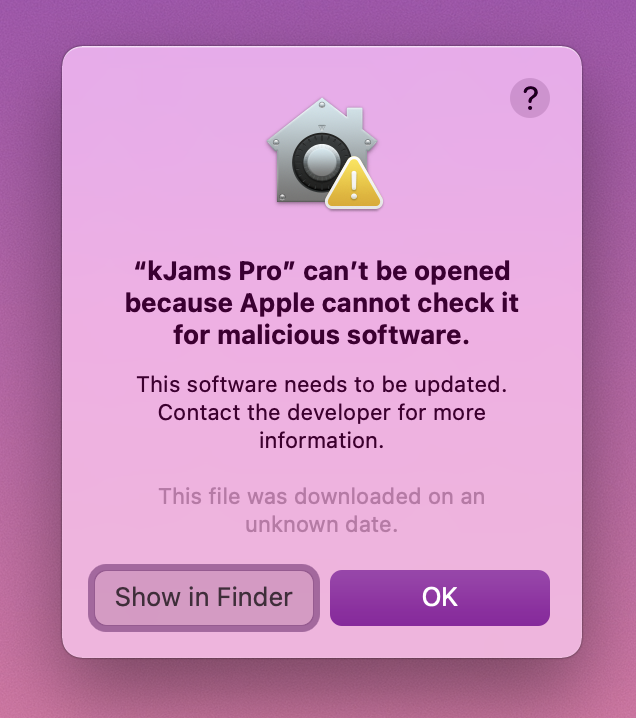
## it will fail to launch, claiming that the OS can't test for malicious software, click ok<br><img src="https://karaoke.kjams.com/screenshots/install/mac/cant_open.png" width="318pix" | ## it will fail to launch, claiming that the OS can't test for malicious software, click ok<br><img src="https://karaoke.kjams.com/screenshots/install/mac/cant_open.png" width="318pix"> | ||
## in the system prefs panel, click back on the "general" tab | ## in the system prefs panel, click back on the "general" tab | ||
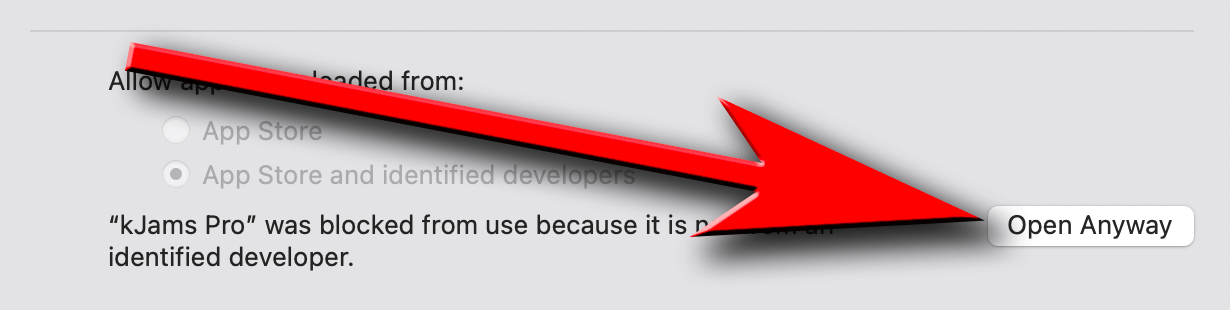
## click on the " | ## click on the "Allow Anyway" button, and kJams will re-open<br><img src="https://karaoke.kjams.com/screenshots/install/mac/open_anyway.png" width="615pix"> | ||
## if you get a zillion asserts about "GetCatInfoBulk" force quit, let me know, and try again | ## if you get a zillion asserts about "GetCatInfoBulk" force quit, let me know, and try again | ||
Revision as of 01:45, 23 May 2021
The Alpha version does not come with an installer, it's just a Zip file.
If you just download it from the web site, you first must unzip it.
Mac Instructions
- Unzip the file if that hasn't already been done
- Drag the app into the "Applications" folder
- When the Finder asks if you want to replace the one that is there, say yes
- First time only:
- go to apple->system prefs->privacy & security
- click the lock icon, enter your password, hit okay
- click the "privacy" tab, on the left, scroll down to "Full disk access"
- drag the app from the finder into the list on the right
- double click the kJams app icon
- it will fail to launch, claiming that the OS can't test for malicious software, click ok
- in the system prefs panel, click back on the "general" tab
- click on the "Allow Anyway" button, and kJams will re-open
- if you get a zillion asserts about "GetCatInfoBulk" force quit, let me know, and try again
Windows Instructions
- Unzip the file if that hasn't already been done
- Drag the app into the "Program Files" folder
- When Windows Explorer says there are files with the same name, click "Replace"
- First time only:
- To create a "Shortcut File" follow these instructions.
- Install the K-Lite Codec pack for h.264 playback