Add To Library/Disabled: Difference between revisions
Jump to navigation
Jump to search
Created page with "On MacOS 10.9.1 "Mavericks", do you have some files that simply refuse to be available to be added or re-linked? Do they appear grayed out in the file selection dialog? Like..." |
No edit summary |
||
| (One intermediate revision by the same user not shown) | |||
| Line 1: | Line 1: | ||
On MacOS 10.9.1 "Mavericks", do you have some files that simply refuse to be available to be added or re-linked? Do they appear grayed out in the file selection dialog? Like this:<br> | On MacOS 10.9.1 "Mavericks", do you have some files that simply refuse to be available to be added or re-linked? Do they appear grayed out in the file selection dialog? Like this:<br> | ||
https://karaoke.kjams.com/screenshots/disabled.png<br> | https://karaoke.kjams.com/screenshots/disabled.png<br> | ||
==How to fix it== | |||
# open the Terminal (find it using Spotlight) | |||
https://karaoke.kjams.com/screenshots/disabled_fix.png<br> | # copy this text below text<br><pre>xattr -d -r com.apple.FinderInfo</pre> | ||
Now press RETURN. | # to correctly copy the text (without a trailing carriage return), double click on "FinderInfo" and keeping the button down on the second click, drag to the left over "xattr", then go to the Edit menu and pick Copy | ||
# go back to Terminal | |||
# paste into the terminal (do NOT press RETURN yet!) | |||
# Make sure there is a space at the end | |||
# In the Finder, find the folder that contains all the files you will want to add or re-link to. This can be the main folder of songs that contains all the sub folders of songs. | |||
# Drag that folder onto the Terminal window, like this:<br>https://karaoke.kjams.com/screenshots/disabled_fix.png<br> | |||
# Now press RETURN. | |||
Now, all your files should be available. | Now, all your files should be available. | ||
Latest revision as of 23:36, 24 January 2014
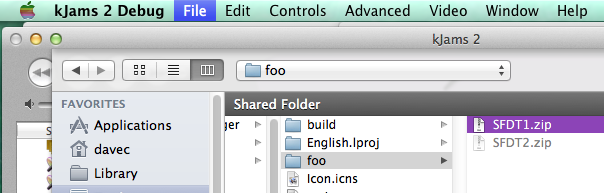
On MacOS 10.9.1 "Mavericks", do you have some files that simply refuse to be available to be added or re-linked? Do they appear grayed out in the file selection dialog? Like this:
How to fix it
- open the Terminal (find it using Spotlight)
- copy this text below text
xattr -d -r com.apple.FinderInfo
- to correctly copy the text (without a trailing carriage return), double click on "FinderInfo" and keeping the button down on the second click, drag to the left over "xattr", then go to the Edit menu and pick Copy
- go back to Terminal
- paste into the terminal (do NOT press RETURN yet!)
- Make sure there is a space at the end
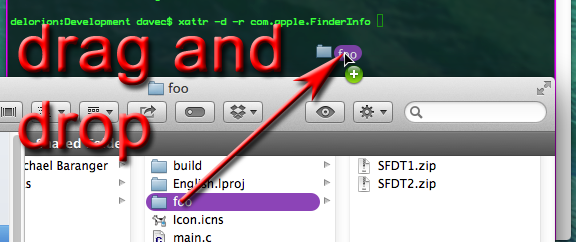
- In the Finder, find the folder that contains all the files you will want to add or re-link to. This can be the main folder of songs that contains all the sub folders of songs.
- Drag that folder onto the Terminal window, like this:
- Now press RETURN.
Now, all your files should be available.