Build/Windows: Difference between revisions
Jump to navigation
Jump to search
No edit summary |
No edit summary |
||
| (10 intermediate revisions by the same user not shown) | |||
| Line 2: | Line 2: | ||
## when installing VS Community: | ## when installing VS Community: | ||
### under "workloads" | ### under "workloads" | ||
#### dotnet | #### dotnet desktop | ||
#### desktop | #### desktop dev with C++ | ||
### then under "individual" | ### then under "individual" | ||
#### dotnet 3.5 | #### dotnet 3.5 | ||
#### SDK 19041 (required to link OleAut32 under Qt6) | #### SDK 19041 (qt 6.4), 22621 (qt 6.5 and above) (required to link OleAut32 under Qt6) | ||
#### | #### MSVC v141, 142: ATL, MFC C++ for build tools (x86 & x64) (not with spectre mitigations)<br><img src="https://karaoke.kjams.com/screenshots/vs_sdk.png" width="50%" /><br> | ||
#### Windows 10 SDK (10.0.22000.0) or later (for C++17) | #### Windows 10 SDK (10.0.22000.0) or later (for C++17) | ||
## prefer "download then install" | ## prefer "download then install" | ||
## on ARM you will need to install debugging libs, [https://wiki.qt.io/Qt_Creator_Windows_Debugging see this article], see the zip file | ## <strike>on ARM you will need to install debugging libs, [https://wiki.qt.io/Qt_Creator_Windows_Debugging see this article], see the zip file</strike> No longer necessary | ||
# when building, you may need to ensure all projects target dotnet 3.5, and that the package assemblies come out of davec/.nuget/packages and not the system paths. note the json library should be v11, NOT v12 as indicated by PaddleSDK | ## you will need to install the extension "Microsoft Visual Studio Installer Projects" for the version of VS that you have (currently 2019) | ||
# Paddle: | |||
## when building, you may need to ensure all projects target dotnet 3.5, and that the package assemblies come out of davec/.nuget/packages and not the system paths. note the json library should be v11, NOT v12 as indicated by PaddleSDK | |||
## for 32bit paddle building is built into the main project | |||
## for 64bit, last i used VS2019, and opened the PaddleExample project. manually build debug / release, both in x64. MAYBE build x32? not sure if necessary | |||
#build the XPlat debug Lite and Pro versions on mac | #build the XPlat debug Lite and Pro versions on mac | ||
#run them each (this will export the windows Menu resources) | #run them each (this will export the windows Menu resources) | ||
| Line 26: | Line 29: | ||
# if IncrediBuild isn't using all cores, to to tray icon->agent settings->VS Builds->Advanced->PDB File Alloc: shut off the limiter | # if IncrediBuild isn't using all cores, to to tray icon->agent settings->VS Builds->Advanced->PDB File Alloc: shut off the limiter | ||
# create [[Build/Build_kJams_script|the build-script.app]] | # create [[Build/Build_kJams_script|the build-script.app]] | ||
# if the Z drive is a network drive, you'll also [https://www.technipages.com/fix-we-cant-verify-who-created-this-file-error/ need to do this], [https://superuser.com/questions/756183/cannot-run-exe-from-network-drive and this] | |||
Latest revision as of 03:40, 27 November 2025
- do the entire "Post Install" folder
- when installing VS Community:
- under "workloads"
- dotnet desktop
- desktop dev with C++
- then under "individual"
- dotnet 3.5
- SDK 19041 (qt 6.4), 22621 (qt 6.5 and above) (required to link OleAut32 under Qt6)
- MSVC v141, 142: ATL, MFC C++ for build tools (x86 & x64) (not with spectre mitigations)
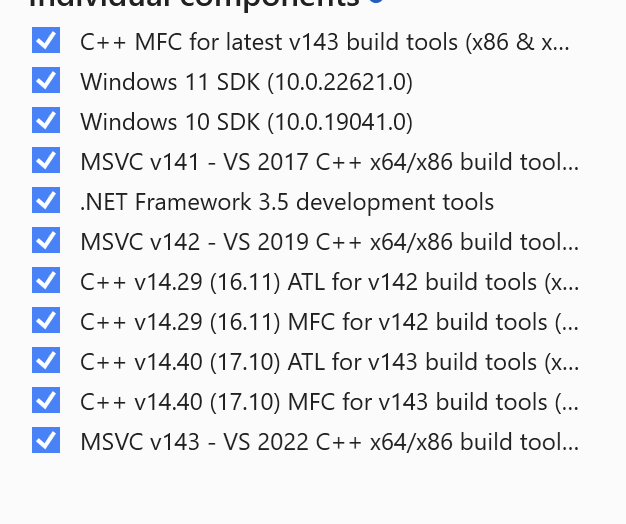
- Windows 10 SDK (10.0.22000.0) or later (for C++17)
- under "workloads"
- prefer "download then install"
on ARM you will need to install debugging libs, see this article, see the zip fileNo longer necessary- you will need to install the extension "Microsoft Visual Studio Installer Projects" for the version of VS that you have (currently 2019)
- when installing VS Community:
- Paddle:
- when building, you may need to ensure all projects target dotnet 3.5, and that the package assemblies come out of davec/.nuget/packages and not the system paths. note the json library should be v11, NOT v12 as indicated by PaddleSDK
- for 32bit paddle building is built into the main project
- for 64bit, last i used VS2019, and opened the PaddleExample project. manually build debug / release, both in x64. MAYBE build x32? not sure if necessary
- build the XPlat debug Lite and Pro versions on mac
- run them each (this will export the windows Menu resources)
- go get the latest CrashRpt
- unzip it to a folder called "CrashRpt" under "depot/kJams/External/
- create the solution file with CMake
- build both debug and release
- in MSDev, go to "Solution Explorer", right click on "kJams", pick "properties". Set "configuration" to "all configurations", go to "configuration properties"->"Debugging",set "command" to:
$(SolutionDir)build\kJams $(ConfigurationName).app\Contents\Windows\$(TargetFileName)
for CFTest, the same command is:$(SolutionDir)build\$(TargetName).app\Contents\Windows\$(TargetFileName)
- in MSDev, go to "Property Pages", then pick "Configuration: All Configurations", then go to "Configuration Properties->Linker->Command Line" and add this:
/DYNAMICBASE /ignore:4099
- install parallels, get that going
- install Perforce, and when creating a workspace, set your linefeeds to "unix"
- change the names of the User Files
- if IncrediBuild isn't using all cores, to to tray icon->agent settings->VS Builds->Advanced->PDB File Alloc: shut off the limiter
- create the build-script.app
- if the Z drive is a network drive, you'll also need to do this, and this