VPN 10.4: Difference between revisions
Jump to navigation
Jump to search
No edit summary |
No edit summary |
||
| (5 intermediate revisions by the same user not shown) | |||
| Line 1: | Line 1: | ||
# Run the application "Internet Connect" Located in your "Applications" folder, it looks like this:<br> | # Run the application "Internet Connect" Located in your "Applications" folder, it looks like this:<br>https://karaoke.kjams.com/resources/internet_connect.png | ||
# File | # from the File menu, pick "New VPN connection..." | ||
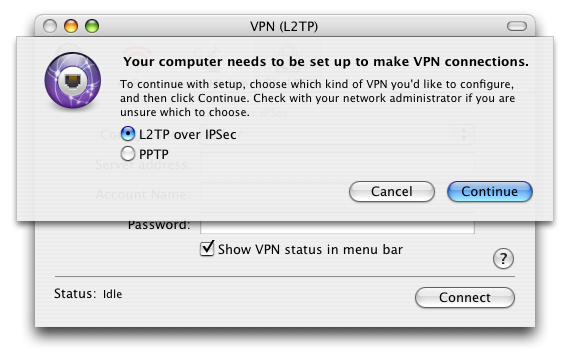
# Pick | # Pick "L2TP over IPSec" from the radio buttons, then press "Continue"<br>https://karaoke.kjams.com/resources/vpn_10.4/1_L2TP.png<br> | ||
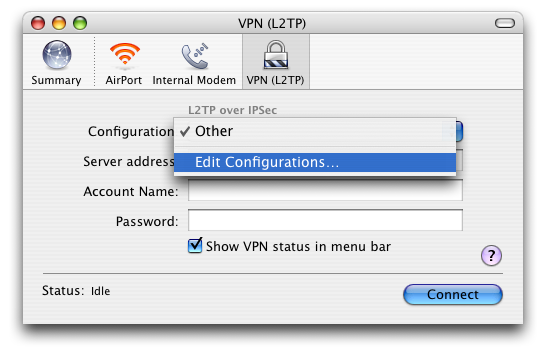
# now pick "Edit Configuration" from the popup menu<br>https://karaoke.kjams.com/resources/vpn_10.4/2_edit_config.png<br> | |||
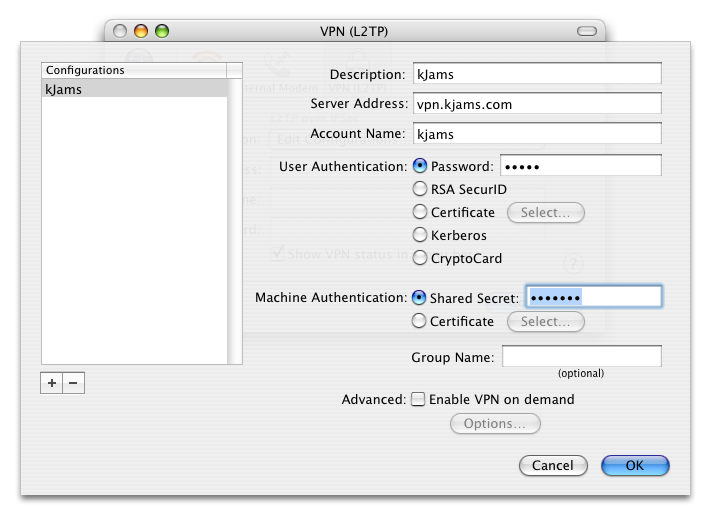
# description: kJams | |||
# server address: vpn.kjams.com | # server address: vpn.kjams.com | ||
# account name: kjams | # account name: kjams | ||
# the password: kjams | # the password: kjams | ||
# shared secret: karaoke<br>https://karaoke.kjams.com/resources/vpn_10.4/3_config.png<br> | |||
# Press "OK" | |||
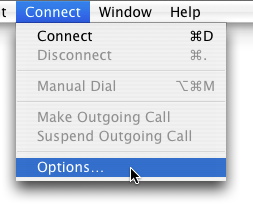
# go to the "Connect" menu and pick "Options…"<br>https://karaoke.kjams.com/resources/vpn_10.4/4_connect_options.png<br> | |||
# Make sure "Send all traffic over VPN connection" is turned OFF, then hit OK<br>https://karaoke.kjams.com/resources/vpn_10.4/5_no_send_all.png<br> | |||
# DO NOT HIT CONNECT: now come back to ichat and tell me "you're ready". do nothing until i've acknowledged that you're ready | |||
# hit connect | # hit connect | ||
| Line 11: | Line 18: | ||
'''At the end of the session:''' | '''At the end of the session:''' | ||
You should disconnect the VPN session from "Internet Connect", it will cause your machine to remotely disconnect my machine from it. I won't be able to see you anymore. | You should disconnect the VPN session from "Internet Connect", it will cause your machine to remotely disconnect my machine from it. I won't be able to see you anymore. | ||
Latest revision as of 21:06, 16 January 2014
- Run the application "Internet Connect" Located in your "Applications" folder, it looks like this:

- from the File menu, pick "New VPN connection..."
- Pick "L2TP over IPSec" from the radio buttons, then press "Continue"
- now pick "Edit Configuration" from the popup menu
- description: kJams
- server address: vpn.kjams.com
- account name: kjams
- the password: kjams
- shared secret: karaoke
- Press "OK"
- go to the "Connect" menu and pick "Options…"
- Make sure "Send all traffic over VPN connection" is turned OFF, then hit OK
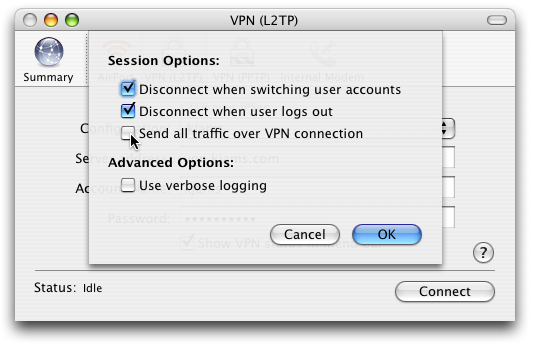
- DO NOT HIT CONNECT: now come back to ichat and tell me "you're ready". do nothing until i've acknowledged that you're ready
- hit connect
You should be connected now to my VPN
At the end of the session: You should disconnect the VPN session from "Internet Connect", it will cause your machine to remotely disconnect my machine from it. I won't be able to see you anymore.