Perforce: Difference between revisions
Jump to navigation
Jump to search
Created page with "#p4 admin stop #p4 verify -q //... #p4 admin checkpoint #use app "LaunchControl" to unload p4d global daemon #delete db.* files #upgrade p4 & p4d #p4d -jr checkpoint.xx <-- fi..." |
No edit summary |
||
| (2 intermediate revisions by the same user not shown) | |||
| Line 1: | Line 1: | ||
==How to do a checkpoint and / or update perforce server to latest== | |||
#p4 admin stop | #p4 admin stop | ||
#p4 verify -q //... | #p4 verify -q //... | ||
#cd into an empty folder (this is where checkpoint files will go) | |||
#p4 admin checkpoint | #p4 admin checkpoint | ||
#use app "LaunchControl" to unload p4d global daemon | #use app "LaunchControl" to unload p4d global daemon | ||
| Line 8: | Line 11: | ||
#ensure the journal file has write access | #ensure the journal file has write access | ||
#p4d -J journal -xu | #p4d -J journal -xu | ||
#start / load p4d | #start / load p4d. If the attempt fails, go to the command line and type p4d, see what the error is. you may just need to run a DB update command, which will helpfully be provided. | ||
#p4 counter lastCheckpointAction | #p4 counter lastCheckpointAction | ||
#p4 verify -q //... | #p4 verify -q //... | ||
#p4 admin restart | #p4 admin restart | ||
==Using [http://www.soma-zone.com/LaunchControl/ LaunchControl] to manage the p4 server daemon== | |||
import [https://karaoke.kjams.com/resources/launch_control/perforce_launchcontrol.xml this file] into LaunchControl as a Global Daemon, ensure it's running. | |||
It should look like this:<br> | |||
https://karaoke.kjams.com/resources/launch_control/perforce_launch_control.png | |||
Latest revision as of 03:30, 6 November 2018
How to do a checkpoint and / or update perforce server to latest
- p4 admin stop
- p4 verify -q //...
- cd into an empty folder (this is where checkpoint files will go)
- p4 admin checkpoint
- use app "LaunchControl" to unload p4d global daemon
- delete db.* files
- upgrade p4 & p4d
- p4d -jr checkpoint.xx <-- fill in number
- ensure the journal file has write access
- p4d -J journal -xu
- start / load p4d. If the attempt fails, go to the command line and type p4d, see what the error is. you may just need to run a DB update command, which will helpfully be provided.
- p4 counter lastCheckpointAction
- p4 verify -q //...
- p4 admin restart
Using LaunchControl to manage the p4 server daemon
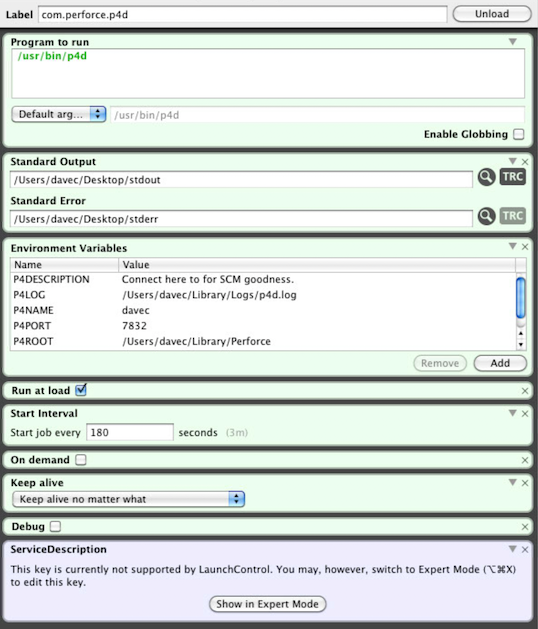
import this file into LaunchControl as a Global Daemon, ensure it's running.
It should look like this: