Music Store/Chartbuster old: Difference between revisions
No edit summary |
No edit summary |
||
| (20 intermediate revisions by 2 users not shown) | |||
| Line 1: | Line 1: | ||
Chartbuster went out of business in 2012; its assets were purchased by [http://www.digitrax.com/ Digitrax], which operates [[Music_Store/KaraokeCloud_Pro|KaraokeCloud]] and [[Music_Store/KaraokeCloud_Pro|KaraokeCloud Pro]]. Everything on this page is now, therefore, only of hysterical interest. | |||
<div class="tright"> | <div class="tright"> | ||
{|cellspacing="0" cellpadding="0" | {|cellspacing="0" cellpadding="0" | ||
|<iimg> | |<iimg>https://www.chartbusterkaraoke.com/!https://karaoke.kjams.com/resources/stores/chartbuster.png</iimg> | ||
|} | |} | ||
</div> | </div> | ||
==Streaming== | ==Streaming== | ||
There are over 12 thousand unique songs available for streaming, and most of them have versions with and without guide or lead vocals. You must sign up with '''Chartbuster''' ahead of time (see "Purchase" links below), and of course you must have an internet connection at the time you wish to stream. When you purchase a streaming pass, you get a " | There are over 12 thousand unique songs available for streaming, and most of them have versions with and without guide or lead vocals. You must sign up with '''Chartbuster''' ahead of time (see "Purchase" links below), and of course you must have an internet connection at the time you wish to stream. When you purchase a streaming pass, you get a "User ID", which you enter into the "Stores" preferences panel. | ||
There are two Tiers available only for '''kJams Lite''', and two separate Tiers available only for '''kJams Pro''', due to licensing restrictions. Note: If you are doing public performances then you must use '''kJams Pro'''. Also note that "private" parties with more than 20 people are legally considered "public". | There are two Tiers available only for '''kJams Lite''', and two separate Tiers available only for '''kJams Pro''', due to licensing restrictions. Note: If you are doing public performances then you must use '''kJams Pro'''. Also note that "private" parties with more than 20 people are legally considered "public". | ||
| Line 24: | Line 25: | ||
| align="center" | 48 Hours | | align="center" | 48 Hours | ||
| | | | ||
| [ | | [https://www.chartbusterkaraoke.com/kjams-vip-pass.html Buy Now] | ||
|- | |- | ||
| All Access | | All Access | ||
| Line 32: | Line 33: | ||
| align="center" | 1 Month | | align="center" | 1 Month | ||
| align="center" | ✓ | | align="center" | ✓ | ||
| [ | | [https://www.chartbusterkaraoke.com/kjams-all-access.html Buy Now] | ||
|- | |||
| Pro 48 Hr Pass | |||
| | |||
| align="center" | ✓ | |||
| align="right" | $9.99 | |||
| align="center" | 48 hours | |||
| | |||
| [https://www.chartbusterkaraoke.com/kjams-pro-pass.html Buy Now] | |||
|- | |- | ||
| KJ/DJ | | KJ/DJ | ||
| Line 40: | Line 49: | ||
| align="center" | 1 Month | | align="center" | 1 Month | ||
| align="center" | ✓ | | align="center" | ✓ | ||
| [ | | [https://www.chartbusterkaraoke.com/kjams-kj-dj-access.html Buy Now] | ||
|- | |- | ||
| Venue | | Venue | ||
| Line 48: | Line 57: | ||
| align="center" | 1 Month | | align="center" | 1 Month | ||
| align="center" | ✓ | | align="center" | ✓ | ||
| [ | | [https://www.chartbusterkaraoke.com/kjams-venue-access.html Buy Now] | ||
|} | |} | ||
The "'''KJ/DJ'''" tier is only for a single KJ. If your business has more than one KJ running shows (ie: working for you), you will need a separate license for each KJ. Sharing your pass is strictly prohibited. | The "'''KJ/DJ'''" tier is only for a single KJ. If your business has more than one KJ running shows (ie: working for you), you will need a separate license for each KJ. Sharing your pass is strictly prohibited. | ||
The "'''Venue'''" tier is only for the owner of a venue (a bar or club where different KJs come on different nights). The venue owner then allows the KJ to use the Venue's pass (" | The "'''Venue'''" tier is only for the owner of a venue (a bar or club where different KJs come on different nights). The venue owner then allows the KJ to use the Venue's pass ("User ID") for the night that they are playing at the venue. If the KJ owns the computer equipment, and they use the pass owned by the Venue, then the KJ must delete the pass from their Preferences at the end of their gig. Note that these passes are monitored closely and will be audited if it seems there are shenanigans going on. | ||
To be clear: '''kJams Lite''' can '''not''' be used in a public setting due to the License Agreement. If you are doing a public show (or large private show) then you '''must''' use '''kJams Pro'''. You can of course use the Pro version for private shows. | To be clear: '''kJams Lite''' can '''not''' be used in a public setting due to the License Agreement. If you are doing a public show (or large private show) then you '''must''' use '''kJams Pro'''. You can of course use the Pro version for private shows. | ||
| Line 62: | Line 71: | ||
There are about 2400 songs available for purchase / download (they can also be streamed). They are USD $1.99 each. Sort by price then scroll down a bit to see them all at once. To sort by some other column, search for "1.99" then sort however you wish. | There are about 2400 songs available for purchase / download (they can also be streamed). They are USD $1.99 each. Sort by price then scroll down a bit to see them all at once. To sort by some other column, search for "1.99" then sort however you wish. | ||
==Downloads with Special Licensing Privileges== | ==Downloads with Special Licensing Privileges== | ||
There are about 60 songs available for purchase / download that | There are about 60 songs available for purchase / download that require special, separate licensing. You can buy the songs, but that does NOT grant you the special license. You must [https://www.chartbusterkaraoke.com/faq#8 arrange a license with Chartbuster] to allow you to use the audio track in your own recordings, or in auditions or in competitions. Theses songs are USD $14.99 each, NOT including licensing. Sort by price to see them at the top of the list, or search for "14.99". For your convenience, they have been <font style="background:Pink;"> Labeled (colored) with Red </font> so they stand out in the store. | ||
==Free Streaming Songs== | ==Free Streaming Songs== | ||
There is also a set of about 50 songs that you can stream for free! This set changes every month, so be sure to update your music store when kJams asks you to (or right before a show) to make sure you've got the latest list. These songs have been <font style="background:PaleGreen;"> | There is also a set of about 50 songs that you can stream for free! This set changes every month, so be sure to update your music store when kJams asks you to (or right before a show) to make sure you've got the latest list. These songs have been <font style="background:PaleGreen;"> Labeled (colored) with Green </font> so you can easily see them. They do not require any sign up or login! To see the list in the music store, first [[Sorting|show the "Label" column]], then either a) sort by Label, then scroll down to the green section, or b) just search for "Label:2" (no quotes). | ||
==Chartbuster Credits== | ==Chartbuster Credits== | ||
You can pre-purchase credits from Chartbuster for use within kJams, this allows for savings when you buy in bulk. [ | You can pre-purchase credits from Chartbuster for use within kJams, this allows for savings when you buy in bulk. [https://www.chartbusterkaraoke.com/kjams-credits.html Log in at Chartbuster] to purchase credits. Credits are also accounted for with a "User ID", which you can input into your Preferences panel. | ||
==Instructions For Use== | ==Instructions For Use== | ||
After you purchase a "Streaming Pass" or "Chartbuster Credits" (see above), log into your account on their web site and follow these steps:<br> | After you purchase a "Streaming Pass" or "Chartbuster Credits" (see above), log into your account on their web site and follow these steps:<br> | ||
# You MUST have purchased the pass or credits thru the links above. If you bought it from outside of the above "kJams" links, then your User-ID WILL NOT WORK. (You can [https://www.chartbusterkaraoke.com/contact-us exchange it at Chartbuster] for one that does, however) | |||
# At the top of the page, click "My Account" | # At the top of the page, click "My Account" | ||
# On the left, click "Account Information" | # On the left, click "Account Information" | ||
# In the middle of the page, Next to "Account Information" select the NUMBERS of your "User ID" and copy it to the clipboard (Mac: ⌘-C, Win: ⌃-C) | # In the middle of the page, Next to "Account Information" select the NUMBERS of your "User ID" and copy it to the clipboard (Mac: ⌘-C, Win: ⌃-C) | ||
# Now paste that number into kJams preferences: (Mac: ⌘-V, Win: ⌃-V)<br> | |||
https://karaoke.kjams.com/screenshots/chartbuster/cb_cust_id.png | |||
==Troubleshooting== | ==Troubleshooting== | ||
On Mac, if purchases fail or if your "User ID" doesn't work, then run Safari (not any other browser), and click here: https://chartbusterkaraoke.com . | On Mac, if purchases fail or if your "User ID" doesn't work, then run Safari (not any other browser), and click here: https://chartbusterkaraoke.com . A sheet should come down telling you it "can't verify the identity", like this:<br> | ||
https://karaoke.kjams.com/screenshots/chartbuster/cert_id.png<br> | |||
Now click the "Show Certificate" button, then check the "Always Trust" check box, then click "Continue", then everything should work!<br> | |||
https://karaoke.kjams.com/screenshots/chartbuster/always_trust.png<br> | |||
If no dialog asks about "identity" or "certificate", that means it's not a certificate problem. | |||
In that case, <email>dave@kjams.com|write to me</email> with your "User ID" and I'll check from here, and coordinate with Chartbuster if necessary. | |||
Latest revision as of 18:46, 22 December 2014
Chartbuster went out of business in 2012; its assets were purchased by Digitrax, which operates KaraokeCloud and KaraokeCloud Pro. Everything on this page is now, therefore, only of hysterical interest.
<iimg> </iimg> </iimg>
|
Streaming
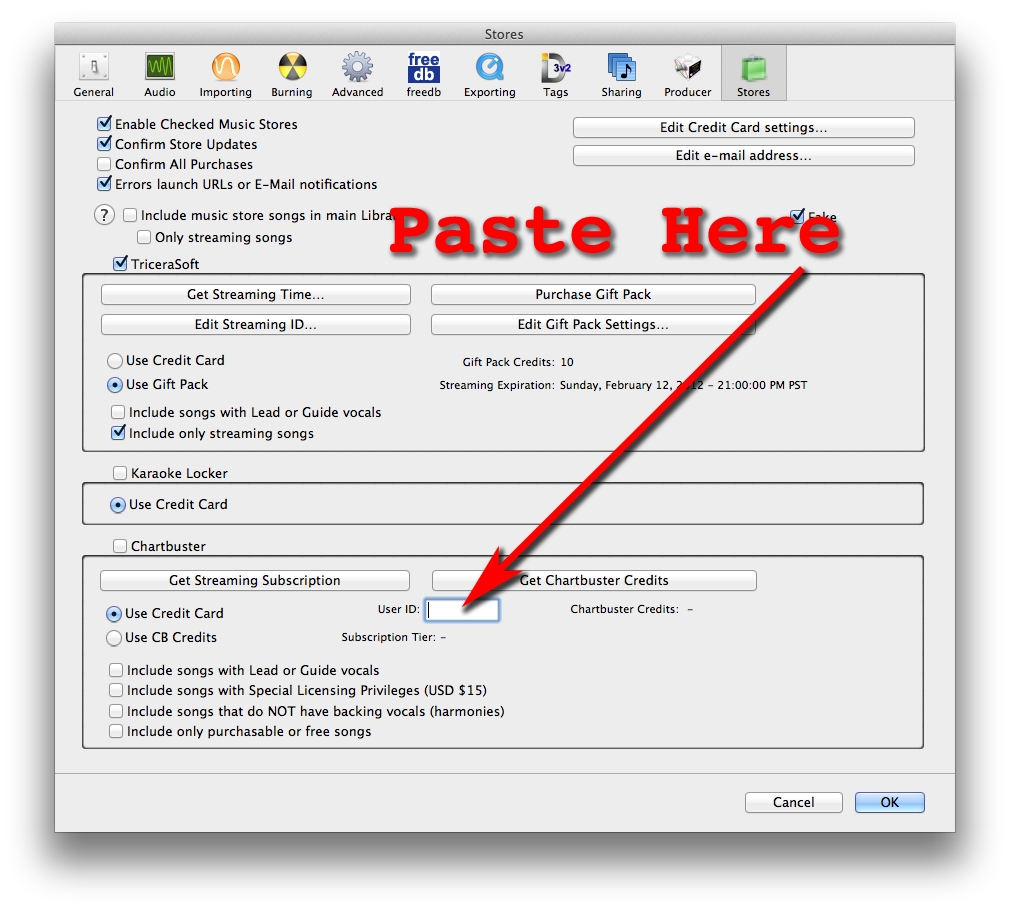
There are over 12 thousand unique songs available for streaming, and most of them have versions with and without guide or lead vocals. You must sign up with Chartbuster ahead of time (see "Purchase" links below), and of course you must have an internet connection at the time you wish to stream. When you purchase a streaming pass, you get a "User ID", which you enter into the "Stores" preferences panel.
There are two Tiers available only for kJams Lite, and two separate Tiers available only for kJams Pro, due to licensing restrictions. Note: If you are doing public performances then you must use kJams Pro. Also note that "private" parties with more than 20 people are legally considered "public".
| Tier | kJams Lite | kJams Pro | Price | Expiration | Auto-Renew | Purchase |
| VIP | ✓ | $3.99 | 48 Hours | Buy Now | ||
| All Access | ✓ | $9.99 | 1 Month | ✓ | Buy Now | |
| Pro 48 Hr Pass | ✓ | $9.99 | 48 hours | Buy Now | ||
| KJ/DJ | ✓ | $19.99 | 1 Month | ✓ | Buy Now | |
| Venue | ✓ | $99.99 | 1 Month | ✓ | Buy Now |
The "KJ/DJ" tier is only for a single KJ. If your business has more than one KJ running shows (ie: working for you), you will need a separate license for each KJ. Sharing your pass is strictly prohibited.
The "Venue" tier is only for the owner of a venue (a bar or club where different KJs come on different nights). The venue owner then allows the KJ to use the Venue's pass ("User ID") for the night that they are playing at the venue. If the KJ owns the computer equipment, and they use the pass owned by the Venue, then the KJ must delete the pass from their Preferences at the end of their gig. Note that these passes are monitored closely and will be audited if it seems there are shenanigans going on.
To be clear: kJams Lite can not be used in a public setting due to the License Agreement. If you are doing a public show (or large private show) then you must use kJams Pro. You can of course use the Pro version for private shows.
See instructions below.
Downloads for Purchase
There are about 2400 songs available for purchase / download (they can also be streamed). They are USD $1.99 each. Sort by price then scroll down a bit to see them all at once. To sort by some other column, search for "1.99" then sort however you wish.
Downloads with Special Licensing Privileges
There are about 60 songs available for purchase / download that require special, separate licensing. You can buy the songs, but that does NOT grant you the special license. You must arrange a license with Chartbuster to allow you to use the audio track in your own recordings, or in auditions or in competitions. Theses songs are USD $14.99 each, NOT including licensing. Sort by price to see them at the top of the list, or search for "14.99". For your convenience, they have been Labeled (colored) with Red so they stand out in the store.
Free Streaming Songs
There is also a set of about 50 songs that you can stream for free! This set changes every month, so be sure to update your music store when kJams asks you to (or right before a show) to make sure you've got the latest list. These songs have been Labeled (colored) with Green so you can easily see them. They do not require any sign up or login! To see the list in the music store, first show the "Label" column, then either a) sort by Label, then scroll down to the green section, or b) just search for "Label:2" (no quotes).
Chartbuster Credits
You can pre-purchase credits from Chartbuster for use within kJams, this allows for savings when you buy in bulk. Log in at Chartbuster to purchase credits. Credits are also accounted for with a "User ID", which you can input into your Preferences panel.
Instructions For Use
After you purchase a "Streaming Pass" or "Chartbuster Credits" (see above), log into your account on their web site and follow these steps:
- You MUST have purchased the pass or credits thru the links above. If you bought it from outside of the above "kJams" links, then your User-ID WILL NOT WORK. (You can exchange it at Chartbuster for one that does, however)
- At the top of the page, click "My Account"
- On the left, click "Account Information"
- In the middle of the page, Next to "Account Information" select the NUMBERS of your "User ID" and copy it to the clipboard (Mac: ⌘-C, Win: ⌃-C)
- Now paste that number into kJams preferences: (Mac: ⌘-V, Win: ⌃-V)
Troubleshooting
On Mac, if purchases fail or if your "User ID" doesn't work, then run Safari (not any other browser), and click here: https://chartbusterkaraoke.com . A sheet should come down telling you it "can't verify the identity", like this:
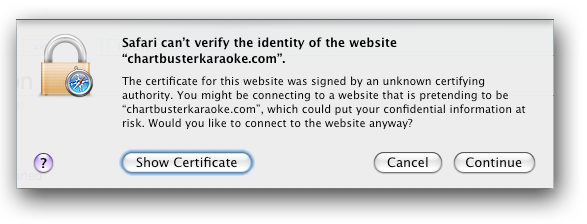
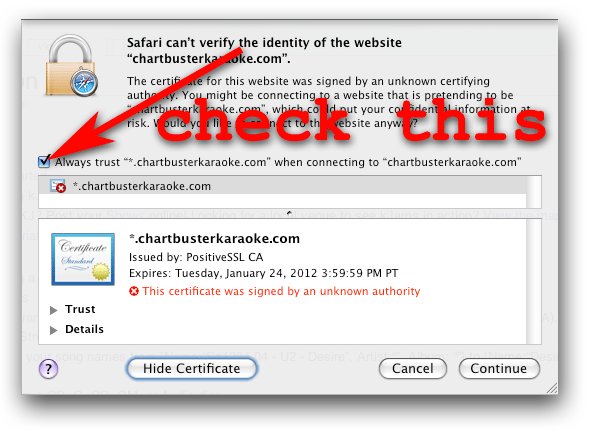
Now click the "Show Certificate" button, then check the "Always Trust" check box, then click "Continue", then everything should work!
If no dialog asks about "identity" or "certificate", that means it's not a certificate problem.
In that case, <email>dave@kjams.com|write to me</email> with your "User ID" and I'll check from here, and coordinate with Chartbuster if necessary.